
It tells you nothing about the value
£18 is decent money for twenty minutes and poor money for fifty. Without the time and the miles behind it, the number on the screen is just a number.
An Uber or Bolt offer gives you a fare and a few seconds. Quick Fare reads it as it appears and shows the numbers that decide it — £ per hour, £ per mile, and the real total time and distance including the drive to the pickup. Then it tells you plainly whether to take it.

Android only · 7-day free trial · Cancel any time
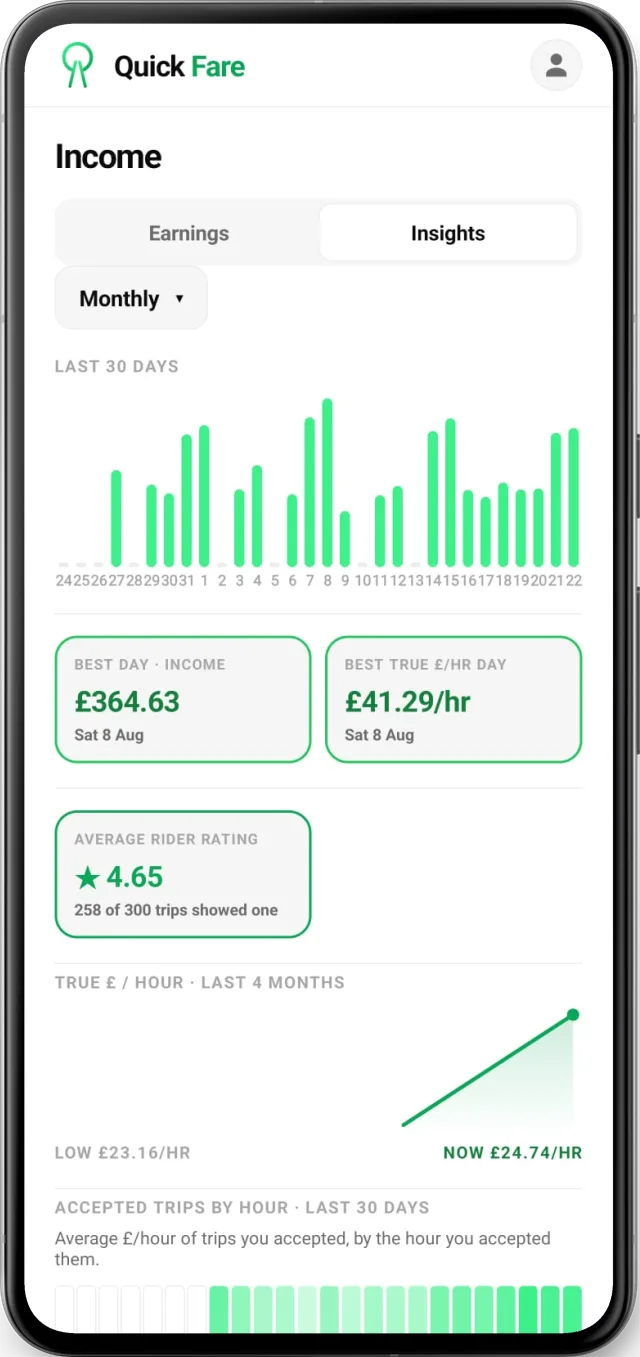
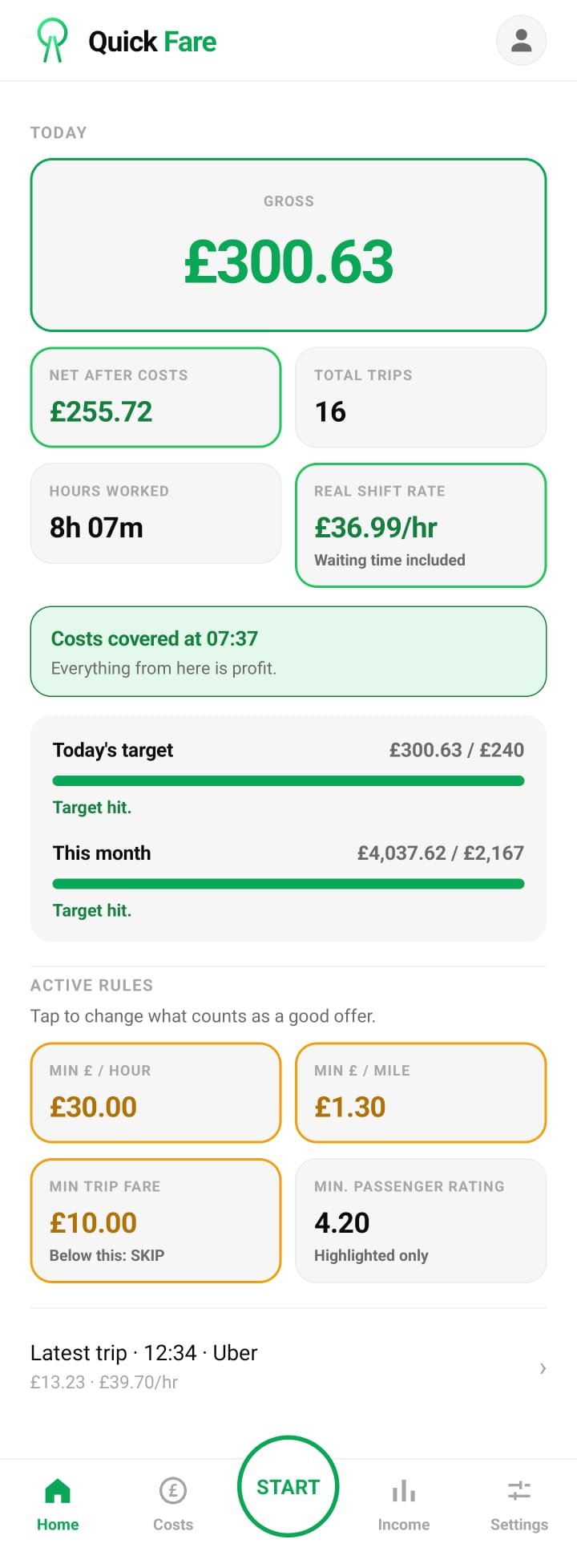
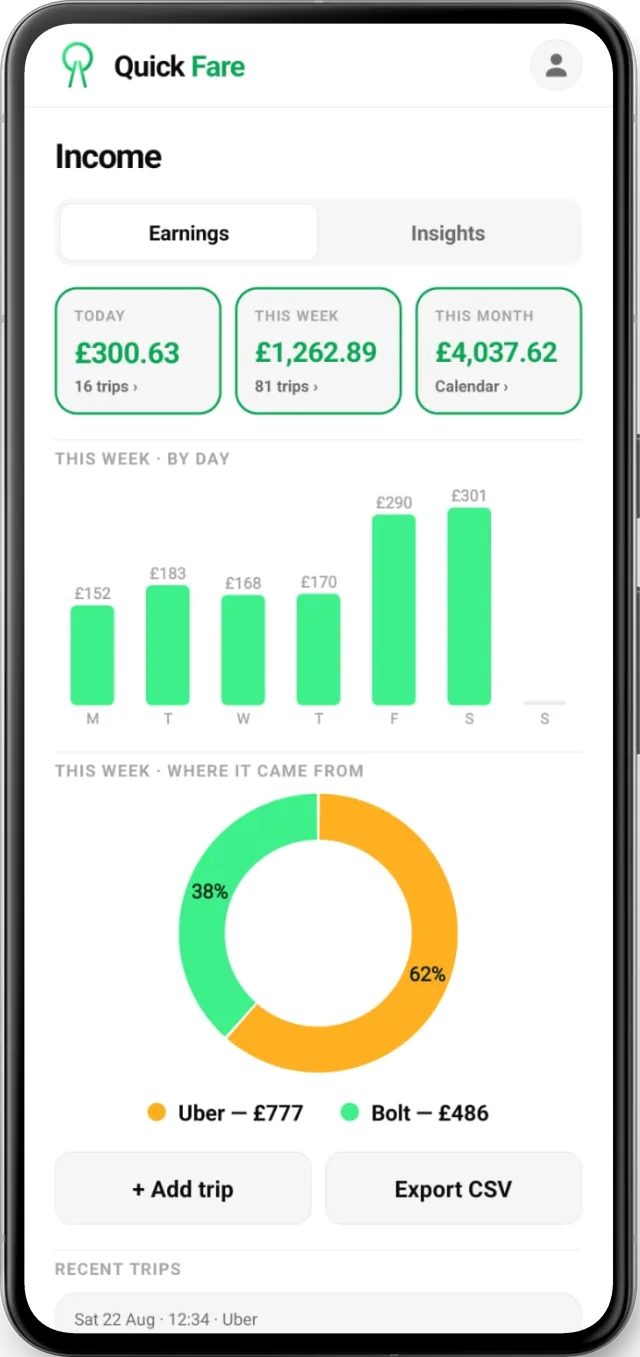
Three things make a job hard to judge, and all three happen at once.
£18 is decent money for twenty minutes and poor money for fifty. Without the time and the miles behind it, the number on the screen is just a number.
You get a few seconds to decide, usually while you are still driving. There is no time to work out the rate in your head, so it comes down to guesswork.
Finance, insurance, fuel or charging, tyres, MOT and servicing all come out of that figure. Until they do, you do not know what the day actually paid.
Not just the fare. It works out the total journey, takes off what the job costs you to run, and shows what it actually leaves in your pocket.
Quick Fare reads the offer the moment it lands and puts the maths on top of it. No tapping, no waiting, no working it out yourself. The numbers are there while the offer is still on screen.
Worked out for that specific job, not an average.
Including the leg to the pickup — the part that quietly eats the rate.
Shown next to the rate, so you see both at a glance.
Colour-coded against the minimums you set, so you know the answer before you have finished reading the numbers.
Beats both of your minimums. Good work at your standard.
Close to your minimums. Your call — position, time of day, direction home.
Falls short of what you said you will work for.
You tell Quick Fare your minimum £ per hour and your minimum £ per mile. Every offer is measured against those figures and nothing else. Drag the slider and watch three real offers change their minds.
Within 10% of your minimum reads as CONSIDER. Your minimum £ per mile works the same way.
Change the minimums and every future verdict changes with them. A wet Friday night and a quiet Tuesday afternoon are not the same job market, and your standard does not have to stay still either.
Every driver mounts the phone differently and every driver app puts its buttons somewhere else. Pick the shape that stays out of your way — then move it.
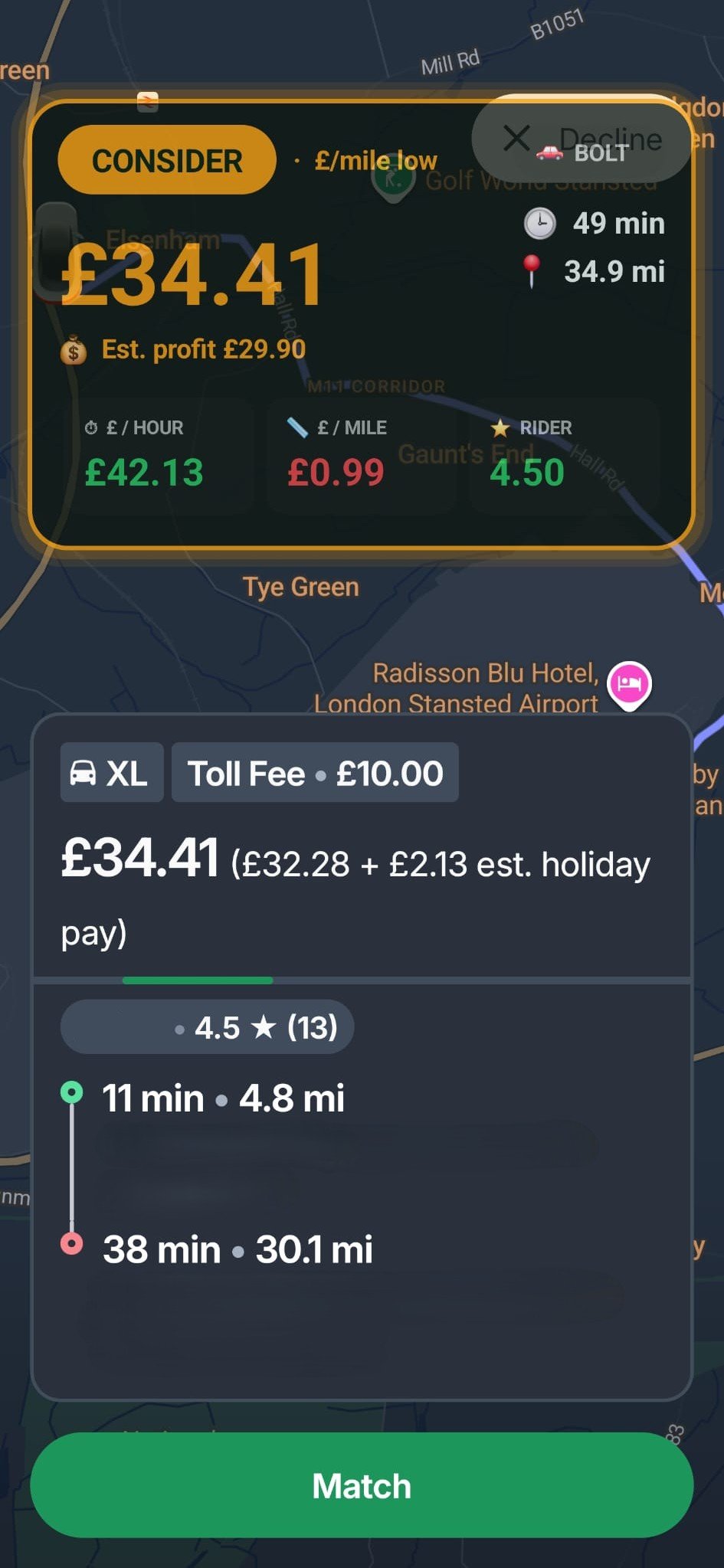
Every metric in full, fixed at the top of the screen and framed by a coloured verdict border.
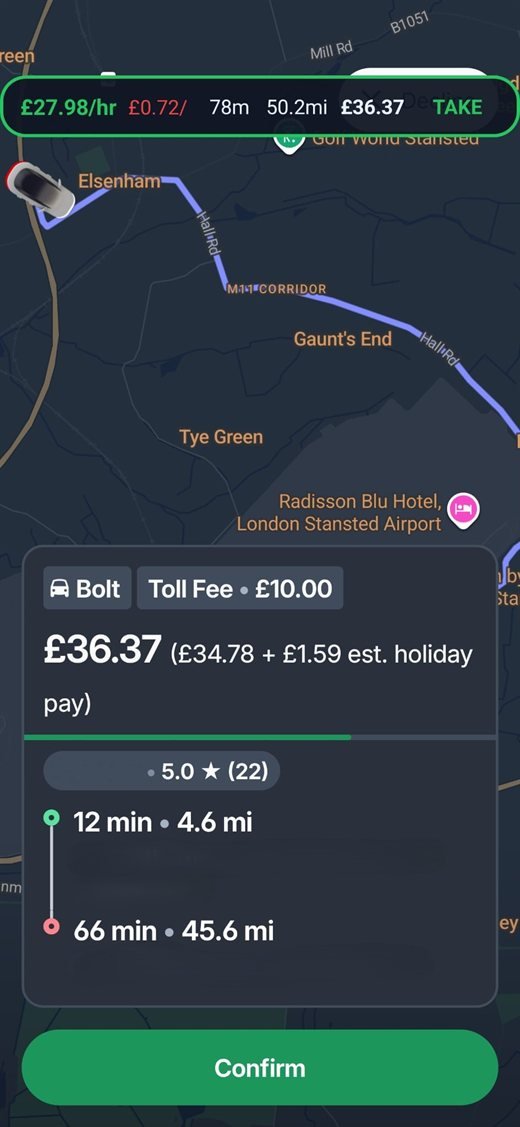
Full width, drag it up or down — so it sits clear of the buttons underneath.
Drag it wherever suits you.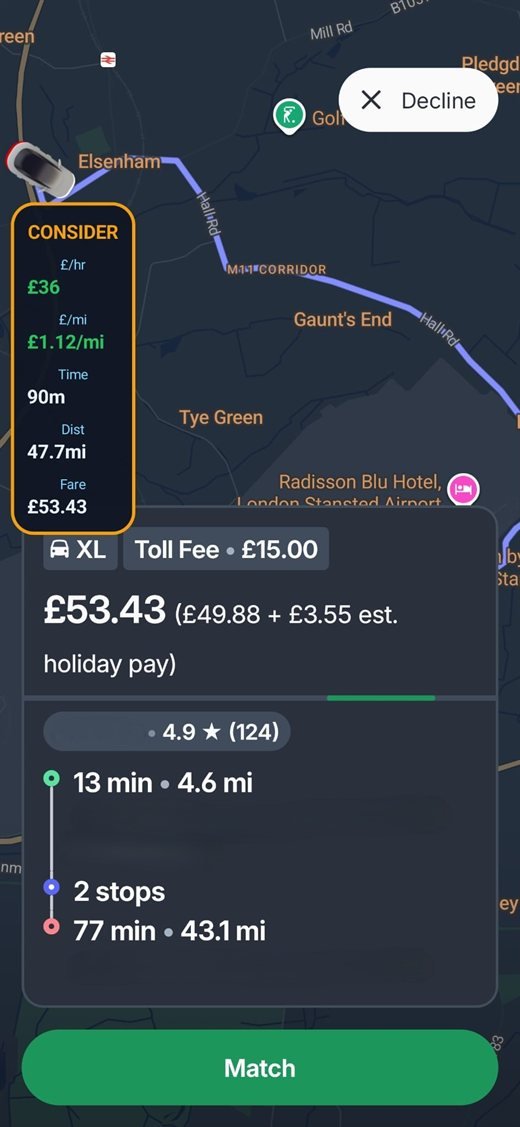
A compact column you can park anywhere, keeping the offer card itself completely clear.
Drag it wherever suits you.Automatic follows your phone, so the Verdict Card is not firing white light at you at two in the morning.
Trip rate counts only the minutes you were on a job. True shift rate divides your earnings by every hour you were out — the queues, the gaps, the dead time, all of it. One is a measure of the jobs. The other is a measure of the day.
What the jobs paid, across the minutes you were on them.
What the day paid, across every hour you were out.
Same money. Same day. Two different questions.
Example: £281.38 earned across a 12-hour shift, of which 7 hours 50 minutes were spent on jobs. The rest went on waiting, driving to pickups and queuing — hours you were working, and hours the job screens never counted. Figures are an illustration, not a forecast.
Through every job, every gap between jobs, every airport queue and every quiet hour. Nothing is rounded off and nothing is left out.
Now you have a number to compare it against instead of a feeling.
The wait is part of your day, so it becomes part of the rate.
Add your costs and you get the take-home rate per hour of your life, not per hour of paid work.
Calculated live for the offer in front of you.
Total time and distance count the drive to the passenger, not just the trip.
One clear verdict against the minimums you set.
Set minimum £/hour and £/mile. Change them whenever the market does.
Large card, horizontal bar or vertical bar, plus light, dark and automatic themes.
Both platforms on one subscription, with no separate setup.
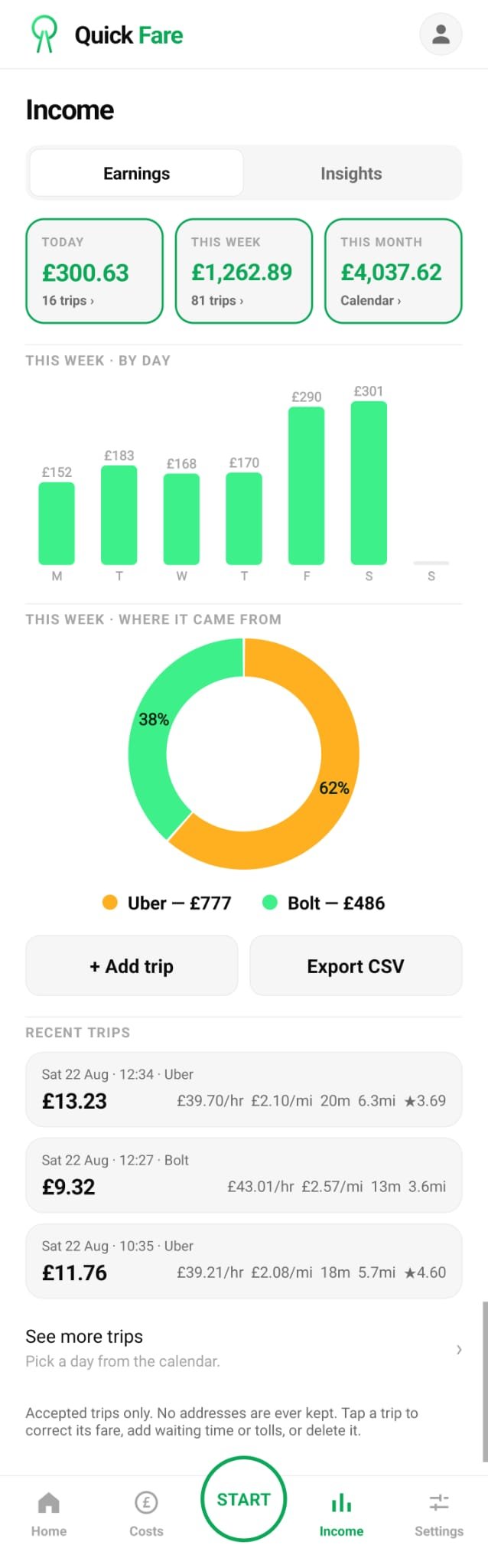
Every job you accept is recorded, including follow-on jobs taken while you are already on a trip. No manual entry.
Quick Fare measures how long a job actually took and recalculates the true £ per hour, rather than trusting the original projection.
Where the platform shows the final settled amount, the logged figure is corrected to what was really paid.
Finance, insurance, fuel or charging, MOT, road tax and maintenance — weekly, monthly or annually, converted into a cost per hour.
With costs in, earnings and verdicts can be shown after costs instead of before them.
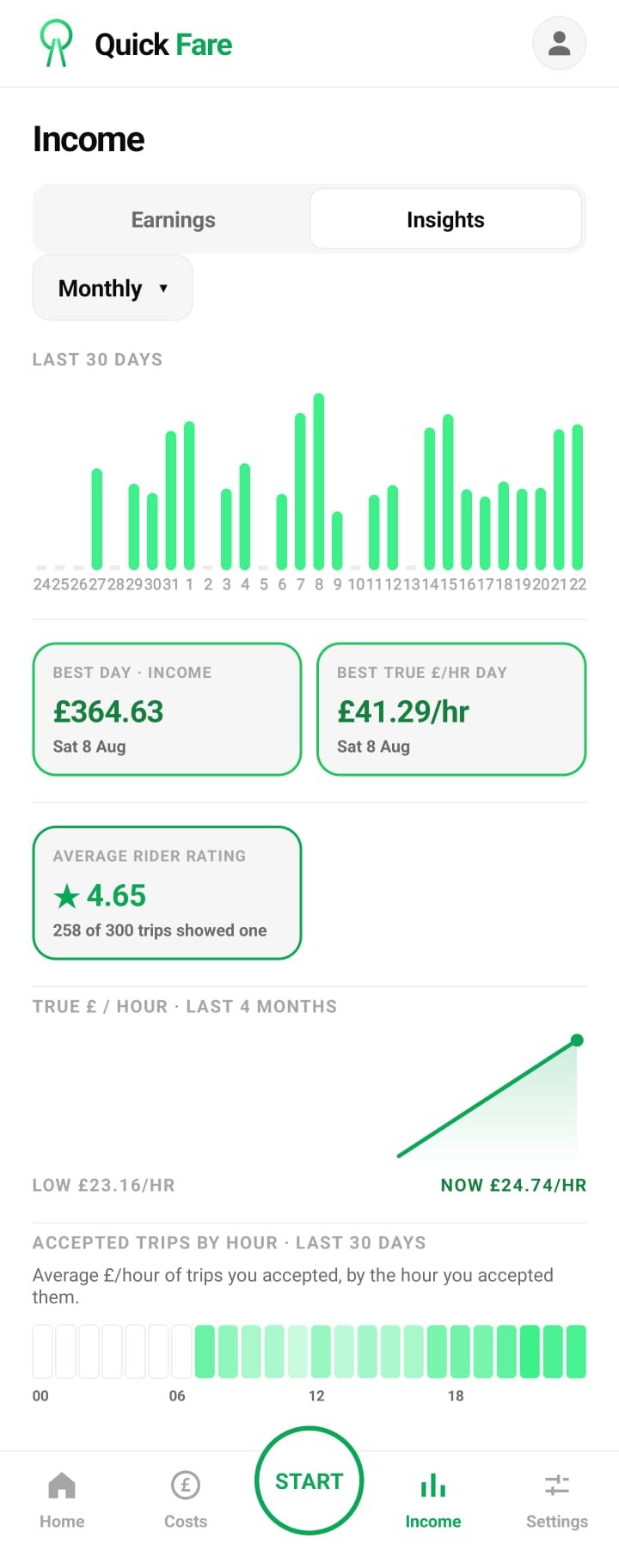
The exact time of day your shift covered its costs and started making money.
Income, expenses and profit, with the split between Uber and Bolt shown as a chart.
Set a weekly income target and watch the progress against it as the week goes on.
Adjust a fare, add waiting time or tolls, or delete an entry that should not be there.
Export your income report as a spreadsheet, ready to hand to your accountant.
One file with your trips, shifts, costs, profile and settings. Keep it anywhere you like.
Start it at the beginning of the shift and leave it running in the background.
There is nothing to set up on this website — everything happens in the app. Setup takes a couple of minutes, and you are not left to work it out alone: there is a short video, and help in the app around the clock.
Android only · Exclusively on Google Play
Android phones and tablets. The app is free to install.
Sign up on your phone. Your 7-day free trial starts there, and you get a link to a short setup video that walks you through the next step.
Android asks you to approve these before the app can do its job. It takes a couple of minutes, the app walks you through it, and help is there if you need it.
Your minimum £ per hour and £ per mile, and your running costs if you want net figures.
Start Quick Fare at the beginning of your shift and it reads offers from then on.
Income, costs, profit, true shift rate and progress against your target — all logged as you went.
Every figure here comes from a real day's driving.
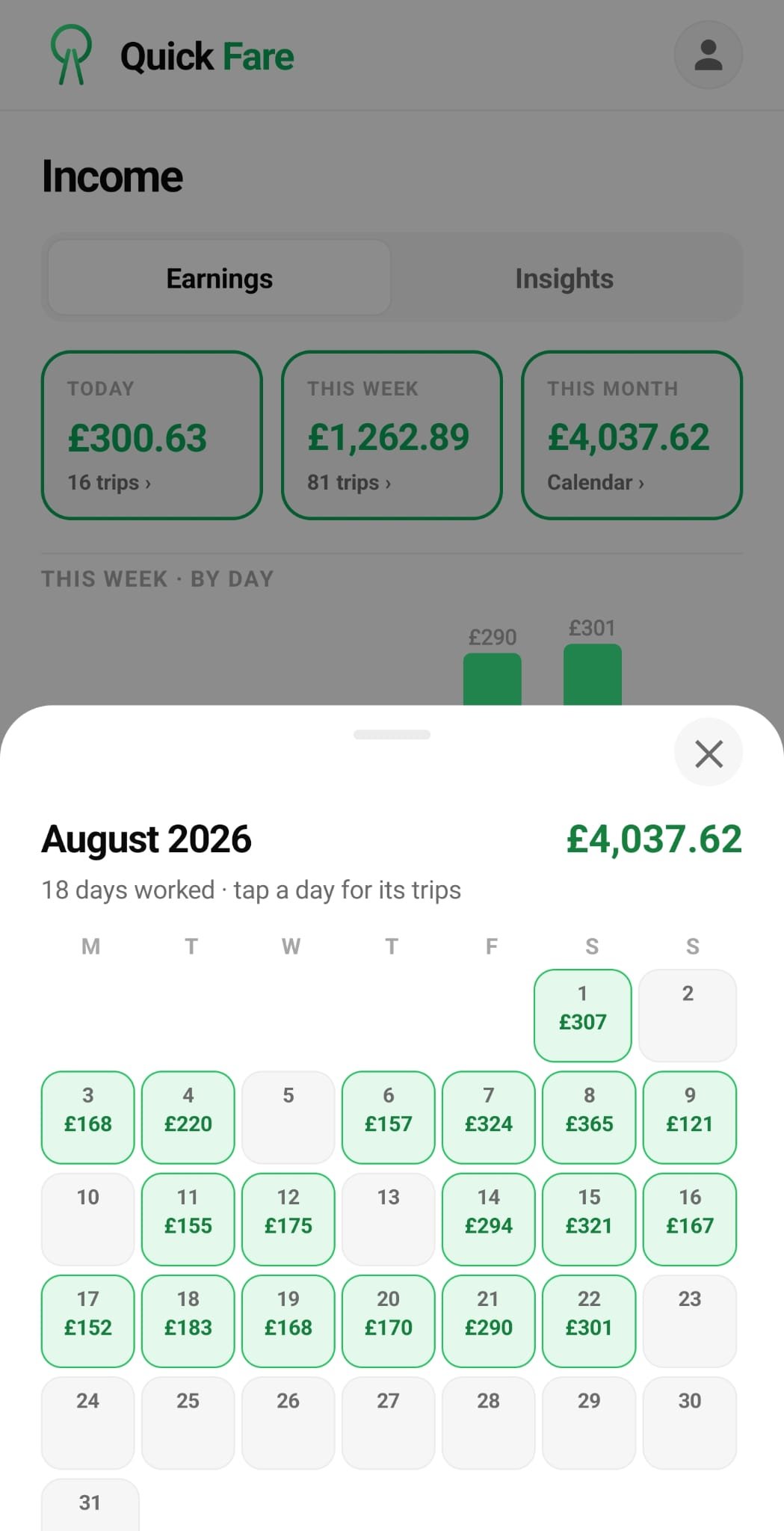
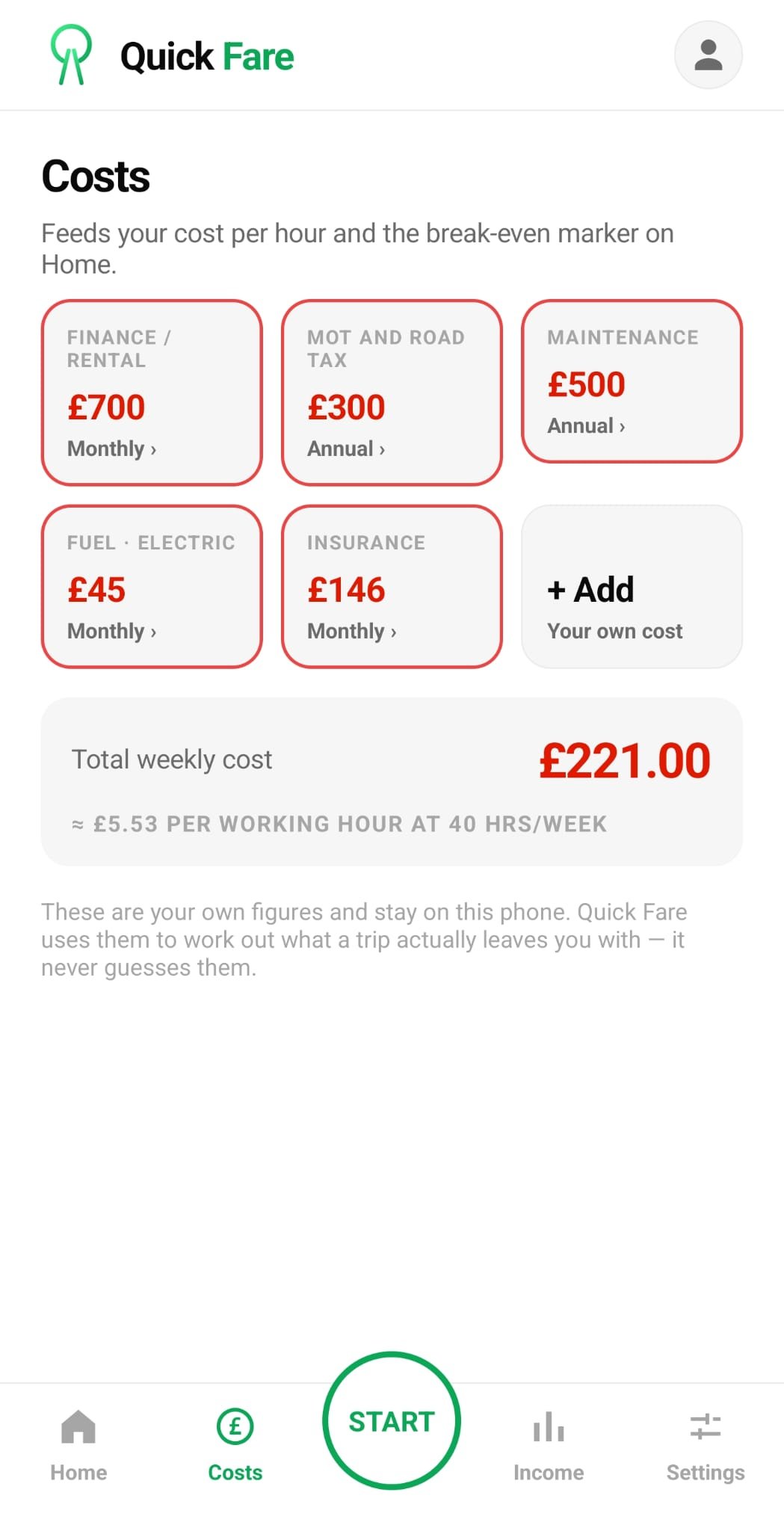
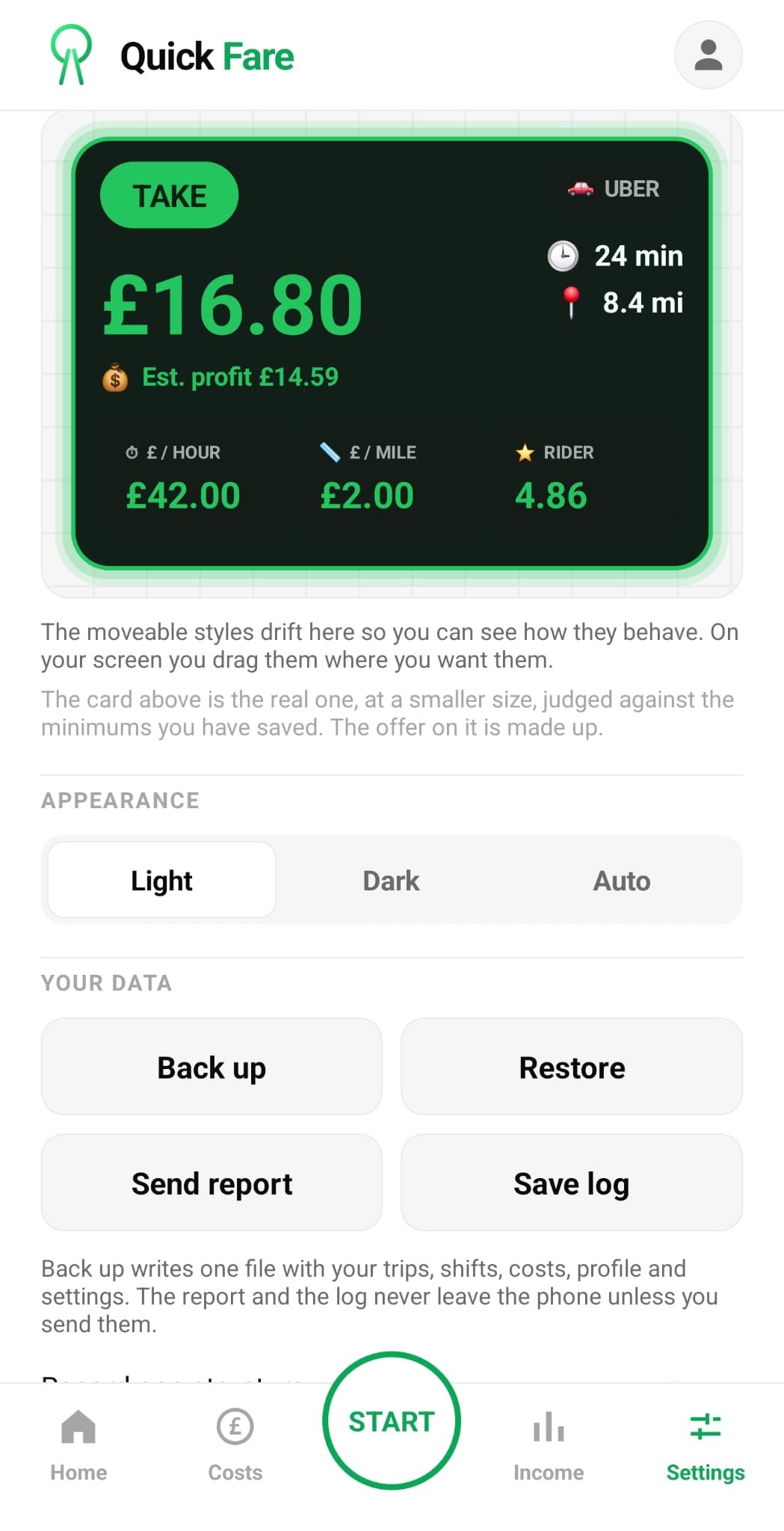
Quick Fare is made by someone who does the job. New features ship regularly, and what gets built next is driven by what drivers ask for. Drivers first, always.
Got an idea, or something that would make your shift easier? Send it to support@quickfare.app — it gets read.
There is an AI assistant built into the app. It answers setup and troubleshooting questions straight away, day or night, and it can see your actual app settings — so it gives you an answer about your phone, not a generic help page. Anything it cannot solve is passed to a real person.
The assistant is available around the clock. A reply from a person depends on the queue — we do not promise an instant human response.
Quick Fare is a read-only tool. It shows you the numbers and then gets out of the way. Every decision on your driver app is still yours, made by your thumb.
A straight look at what you get, against what driver tools typically offer.
| Feature | Quick Fare | Competitors |
|---|---|---|
| Works with Uber | Yes | Yes |
| Works with Bolt | Yes | Rarely |
| One subscription covers both platforms | Yes | Not typically |
| Live verdict on every offer | Yes | Varies |
| £/hour and £/mile per offer | Yes | Varies |
| Includes the pickup leg in the maths | Yes | Varies |
| Your own minimum £/hour and £/mile | Yes | Varies |
| Three Verdict Card layouts | Yes | Not typically |
| Light and dark themes | Yes | Varies |
| Automatic trip logging | Yes | Varies |
| Logs jobs accepted mid-trip | Yes | Not typically |
| Measures the real trip duration | Yes | Not typically |
| True shift rate, including gaps | Yes | Not typically |
| Running costs and net earnings | Yes | Varies |
| Weekly and monthly profit reports | Yes | Varies |
| Weekly target planner | Yes | Not typically |
| Never touches your rideshare app | Yes, read-only | Varies |
| Built in the UK for UK drivers | Yes | Varies |
Comparison based on publicly available information at the time of writing. Features and pricing change — check any app's current details before subscribing.
Here's what other drivers are saying.
“The colour-coded alerts make it incredibly easy to spot profitable Uber and Bolt trips instantly. Setting my minimum £/mile has completely changed how I work for the better.”
“QuickFare's analytics graph finally helped me figure out the absolute best times to drive in London. Tracking my daily expenses alongside my fares gives me a true picture of my actual earnings.”
“I love how the app records every trip I accept so I can review my weekly performance at a glance. The minimum passenger rating filter saves me from picking up problematic riders.”
“Great tool for keeping track of car payments, insurance, and taxes all in one place. It took me a little while to set up my custom £/hour requirements, but it works flawlessly now.”
“Being able to see my monthly overview in detailed charts keeps my finances perfectly organized. QuickFare is an absolute must-have if you want to maximize your ride-sharing profits.”
“The visual data analytics show me exactly when the busy periods hit, letting me plan my shifts perfectly. Seeing a green flash for a high-paying Bolt job takes all the guesswork out of driving.”
“Entering my weekly car rental and insurance costs directly into the app makes tax prep a breeze. The automatic trip recording feature ensures I never lose track of my daily volume.”
“Setting a minimum fare requirement means I no longer waste time on trips that do not pay enough. QuickFare gives me the confidence to reject bad offers and wait for the right ones.”
“Managing both Uber and Bolt is so much easier now that QuickFare colour codes the incoming requests. The monthly breakdown of my earnings versus my expenses is incredibly insightful.”
“I rely heavily on the visual charts to adjust my driving schedule week by week. Knowing exactly what I am making per hour in real-time is a massive advantage.”
“The expense tracking feature handles everything from fuel to my annual vehicle tax without any hassle. QuickFare's instant £/mile calculation helps me accept only the most profitable journeys.”
“Having my entire driving history recorded automatically makes managing my business completely stress-free. The passenger rating filter is brilliant for ensuring I only get reliable customers.”
“I instantly know if a job meets my minimum £/hour requirement just by glancing at the screen colour. The analytics dashboard is top-notch and provides a crystal clear view of my profits.”
“Logging all my business expenses like insurance and maintenance has never been this straightforward. QuickFare is simply the most powerful tool I have used for driving in the UK.”
“The ability to see busiest times visually helps me avoid dead miles and maximize my income. Every private hire driver needs this app to stay ahead of the game.”
They rotate on their own — or scroll, swipe, use the arrows
No feature-gating, no add-ons, no upsells. The only difference between the plans is how long you pay for at once.
Every feature included.
Every feature included.
Every feature included.
7-day free trial. Nothing is charged until the trial ends.
Android only. Subscribe in the app with your Google account. There is nothing to buy on this website.
Cancel any time in your Google Play subscriptions.
It is a business expense. Keep the receipt with your records.
Put it against your own numbers. Skipping a single badly paid job in a month covers the cost of the month.
Android only · 7-day free trial · Cancel any time
No, and it never will. Quick Fare is read-only. It reads the offer on screen and shows you the numbers. It does not tap, accept, decline or control your rideshare app in any way. Every decision is yours.
Yes, both, on one subscription. There is no separate setup for each platform and no second fee.
Trip rate counts only the minutes you were on a job. True shift rate divides your earnings by every hour you were out — queues, gaps and dead time included. It is the number that tells you what the day actually paid.
Android only for now. Quick Fare is available exclusively on Google Play.
In the app. You subscribe with your Google account after the 7-day free trial. There is nothing to buy or set up on this website.
Yes. Cancel in your Google Play subscriptions whenever you like. Cancel during the free trial and you are not charged at all.
Your trips, costs and reports stay on your own phone. Quick Fare does not collect pickup or drop-off addresses, or any passenger details. It reads only the rideshare apps' offer and trip screens.
No. Start Quick Fare at the beginning of your shift and it runs in the background, showing the verdict on offers as they come in while you use your driver app as normal.
No. Quick Fare keeps your records and exports your income report as a CSV file you can hand to your accountant. It is not a tax filing or accounting service.
Yes, that is the whole idea. You set a minimum £ per hour and a minimum £ per mile, and every offer is judged against your figures. Change them and every future verdict changes too.
Yes. Choose the large card fixed at the top, a full-width bar you drag up and down, or a compact vertical bar you can park anywhere. Light, dark and automatic themes are included.
There is an AI assistant built into the app that answers setup and troubleshooting questions using your actual app settings, day or night. Anything it cannot solve goes to a real person.
Download from Google Play, create your account in the app and subscribe in the app. There is nothing to set up on this website.
Android only · 7-day free trial · Cancel any time
Something you would rather ask a person? Use the form, or email support@quickfare.app.